Important: an upgraded version of this application is available here; Using C# with ADU USB Data Acquisition Products (Visual Studio 2019)
 ADU Data Acquisition Interface Products
This page describes a sample C# program that uses the AduHid DLL to
communicate with an Ontrak ADU USB Interface Device.
The source code can be viewed by using Visual Studio dot net to open the AduSharp.sln
solution file.
The AduSharp sample is a minimal application that demonstrates:
- Opening a connection to an ADU device
- Writing a command string to an ADU device
- Reading a response from an ADU device
- Closing the connection
For the sake of clarity the sample program neglects all error checking and exception
handling.
The sample is intended for tutorial purposes only.
AduSharp Screen Shot
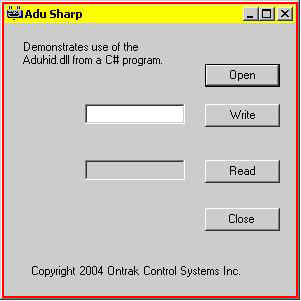
Using AduSharp
- Connect your ADU device to a USB socket on your PC
- Start the AduSharp application
- Left-click the Open button to establish a connection with the ADU device
- Type a command into the entry box beside the Write button (see the manual for your model of ADU device for a list of commands)
- Left-click the Write button to send the command to the ADU device
- If the ADU command is one that elicits a response from the ADU device then left-click the Read button to see the response
- Repeat for as many commands as you like
- When done left-click the Close button
Programming Notes....
AduHid DLL
The AduHid is a C DLL and needs the System Runtime InteropServices
to allow access from a C# application.
The example code expects to find the AduHid DLL in the same directory as the AduSharp.exe
file.
String Types
The AduHid DLL returns a character string as a null-terminated ASCII
string.
Use the StringBuilder class to allocate a buffer for the returned string.
The buffer can be converted to a System.String with the StringBuffer.ToString() function.
API Details
Further details about using the AduHid DLL can be found in the SDK available from the programming section of this website.